
Download Tattoo Cook – AI‑Powered Tattoo Design Generator, Free Credits, High‑Resolution Artwork
Introduction
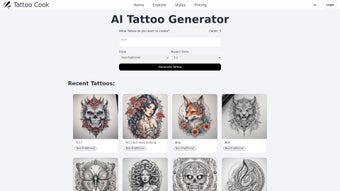
Tattoo Cook is a cloud‑based, AI‑driven design platform that turns a simple text prompt into a fully realized tattoo concept within seconds. By focusing exclusively on tattoo aesthetics, the service offers a curated library of styles—neo‑traditional, minimalist, Japanese, tribal, watercolor, black‑grey, and many niche variations—so that each output respects the line‑work, shading, and composition rules that professional tattoo artists expect. The workflow is intentionally straightforward: type a brief description, choose a style, set an aspect ratio that matches the intended body placement, and let the generative model produce a set of four high‑resolution variations.
Users can download the results instantly in 300 dpi PNG or scalable SVG formats, completely free of watermarks when a credit is applied. What makes Tattoo Cook stand out is its risk‑free entry point: three free design credits are granted to every new visitor, allowing a hands‑on test without any registration. After the trial, credits can be purchased individually or via flexible subscription plans that scale from hobbyists to busy studios.
All processing occurs on secure HTTPS‑encrypted servers, ensuring that prompt data and generated artwork remain private. While the AI’s output quality depends heavily on how clearly the user describes the desired tattoo, the platform compensates with a built‑in “retry” feature that re‑uses the same credit for prompt tweaks within a short window. In short, Tattoo Cook delivers a fast, affordable, and secure way to brainstorm tattoo ideas, dramatically reducing the time and cost traditionally spent on hand‑drawn concept sketches.
Features & Installation Guide
- AI‑Generated Designs: Creates original tattoo artwork from textual prompts in under 15 seconds.
- Extensive Style Library: Supports more than 15 tattoo styles, each with detailed line‑weight and shading presets.
- Aspect Ratio Control: Customizable ratios to fit forearm, back, chest, ankle, or any body part.
- High‑Resolution Export: Download 300 dpi PNG or vector SVG files without watermarks.
- Free Trial Credits: Three complimentary credits for first‑time users.
- Scalable Credit Packages: One‑off purchases or monthly subscriptions with bulk discounts.
- No Login Required for Trial: Immediate access via any modern browser.
- Secure Cloud Processing: All data transmitted over encrypted HTTPS.
- Cross‑Platform Access: Works on Windows, macOS, Linux, Android, and iOS browsers.
- Community Inspiration Gallery: Browse anonymously shared designs for ideas.
Step‑by‑Step Installation & Usage
Tattoo Cook is a pure web application, so there is no traditional installation. Follow these steps to start creating instantly:
- Open the Site: Navigate to tattoocook.com using Chrome, Firefox, Edge, or Safari. The interface loads within seconds thanks to CDN acceleration.
- Enter Your Prompt: In the “Describe your tattoo” box, type a concise description. Include the main subject (e.g., “a koi fish”), mood (“dynamic and flowing”), and any specific elements (“with cherry blossoms”). Clear prompts yield sharper results.
- Select a Style: Choose from the dropdown menu. Hover over each style for a tooltip that explains typical line weight, shading technique, and color palette.
- Set Aspect Ratio: Pick a preset (square, portrait, landscape) or enter custom dimensions that match the intended placement on the body.
- Generate: Click “Cook My Tattoo.” The AI processes the request in 8‑12 seconds and presents a grid of four variations.
- Review & Download: Click a thumbnail to enlarge. If satisfied, hit the download icon; the file is saved as a high‑resolution PNG or SVG without a watermark.
- Purchase Additional Credits (Optional): When free credits are exhausted, click “Add Credits” and complete a secure checkout via Stripe or PayPal. Credits appear instantly.
- Iterate Quickly: To explore variations, edit the original prompt slightly and press “Regenerate.” The system re‑uses the same credit if the retry occurs within a short time window.
Because all heavy lifting occurs on Tattoo Cook’s cloud servers, even low‑end devices can generate professional‑grade concepts without lag. Studios benefit from the ability to share a single workstation across multiple artists, cutting software licensing costs while keeping the client consultation process fast and interactive.
Compatibility, Pros & Cons, and Frequently Asked Questions
Tattoo Cook runs entirely in the browser, making it compatible with any operating system that supports modern web standards. Below is a quick compatibility matrix:
- Windows: 10, 11 – Chrome, Edge, Firefox, Opera (latest).
- macOS: Monterey, Ventura – Safari, Chrome, Firefox.
- Linux: Ubuntu 20.04+, Fedora 34+, Debian 11 – Chrome or Firefox.
- iOS: 14+ – Safari or Chrome (WebKit‑based).
- Android: 9+ – Chrome or Firefox.
A stable internet connection of at least 3 Mbps is recommended for smooth generation. No additional plugins, extensions, or local installations are required, which also reduces the attack surface for potential security threats.
Pros
- Instant, high‑quality designs appear within seconds.
- Broad tattoo‑specific style library that caters to professional needs.
- Three free credits let new users test the service risk‑free.
- Watermark‑free, high‑resolution downloads ready for studio use.
- Browser‑based, no installation, works on all major OS platforms.
- Encrypted HTTPS processing protects user data.
- Scalable credit packages for occasional hobbyists and busy studios.
- Intuitive UI requires no prior design software experience.
- Community gallery offers inspiration while preserving privacy.
- Regular updates improve prompt handling and style accuracy.
Cons
- Result quality heavily depends on how clearly the prompt is written.
- No built‑in real‑time editing; changes require a new generation.
- Requires an active internet connection for every design.
- Free tier limited to three credits, which may be insufficient for extensive testing.
- Complex shading or highly custom techniques often need manual refinement by a human artist.
Frequently Asked Questions
How many free designs can I generate with Tattoo Cook?
New users receive three free credits. Each credit creates one set of four design variations, allowing you to explore multiple concepts before purchasing.
Can I specify a color palette for my tattoo?
Yes. Include color details directly in your prompt (e.g., “vibrant teal and gold” or “black‑grey only”). The AI interprets these cues, though highly precise palettes may need final tweaking in a graphics editor.
Is Tattoo Cook safe for commercial studio use?
Absolutely. All data transfers are encrypted via HTTPS, and once downloaded the artwork is yours to use commercially without additional royalties.
Do I need to install any software or plugins?
No. Tattoo Cook runs entirely in the browser, so any modern device with a supported browser can access the full feature set.
What payment methods are accepted for buying credits?
Tattoo Cook accepts major credit cards (Visa, MasterCard, American Express), PayPal, and Apple/Google Pay where available. All transactions are processed through Stripe, ensuring PCI‑DSS compliance.
Conclusion – Should You Download Tattoo Cook?
Tattoo Cook delivers a compelling blend of speed, style variety, and affordability that makes it a valuable addition to any tattoo artist’s toolkit. The AI engine produces high‑resolution concepts in seconds, the free‑credit trial eliminates upfront risk, and the scalable credit system adapts to both hobbyists and bustling studios. While the platform does rely on clear prompts and lacks live editing, these trade‑offs are outweighed by the convenience of instant, watermark‑free outputs and the security of cloud‑based processing. If you need a fast, cost‑effective way to generate custom tattoo ideas, streamline client consultations, or simply explore new artistic directions, Tattoo Cook is worth the download.
Ready to start creating? Download Tattoo Cook now, claim your three free credits, and begin designing ink‑ready artwork that stands out on any skin canvas.



.png)



